Written by: Jin Fujisaki / Published: 2026-02-02
"Flick input is fast. But it's soulless." "Whenever I type long messages, the typos drive me crazy."
If you're from the generation that once tore through emails on a BlackBerry, or if you're simply fed up with tapping on a slab of glass, this yellow case might just be your savior.
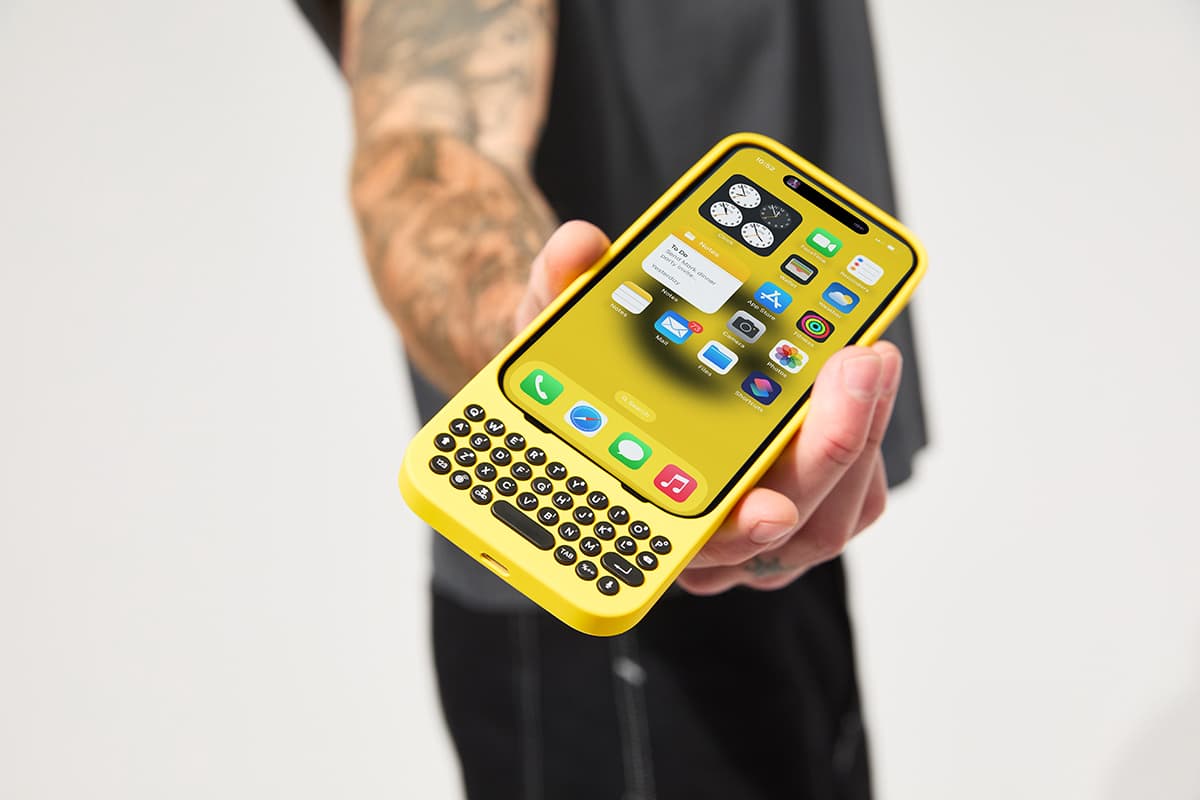
Today we're introducing "Clicks" — a case for the iPhone with a built-in physical keyboard.
It was developed by a team including the renowned tech YouTuber Michael Fisher, aka "MrMobile." Their love for physical keys ran wild and crystallized into this product. In exchange for making your iPhone absurdly long, it grants you sublime keystrokes and unmatched efficiency.
- | No Bluetooth Needed — Direct Connection Means Instant Response
- | The Hidden Perk: "The Virtual Keyboard Disappears"
- | Operate Your iPhone Like a PC with Shortcut Keys
- | For Input Junkies Who Don't Mind a Longer Phone
- | Conclusion: Evolution That Defies the Times
- | Related Information
| No Bluetooth Needed — Direct Connection Means Instant Response
image Keitai Watch
Clicks isn't just another "case with a keyboard." It's a tool made by gadget geeks, for gadget geeks.
Its biggest distinguishing feature is that it doesn't connect via Bluetooth — instead, it plugs directly into your iPhone's port (Lightning or USB-C). That means no pairing hassles, and no charging required (it draws power from the iPhone's battery, but the consumption is negligible). Zero lag.
The rounded keys nestled at the bottom of the case have an exquisite click feel reminiscent of the old BlackBerry days. That snappy "click, click, click" sensation alone transforms replying to emails from a chore into pure entertainment.
| The Hidden Perk: "The Virtual Keyboard Disappears"

image MdN Design
The single biggest benefit of using a physical keyboard? Screen real estate.
Normally, when we're writing Instagram captions or composing long emails, the bottom half of the screen is hijacked by the virtual keyboard. But with Clicks, that keyboard never appears.
You can type with content displayed edge to edge across the screen. This expanded "field of view" is genuinely striking. When you're commenting during a live stream, the video never gets covered up. For creators and businesspeople, this expanded display area translates directly into productivity.
| Operate Your iPhone Like a PC with Shortcut Keys

image Helen Tech
What's truly obsessive (in the best way) about Clicks is its full support for iOS shortcut features.
Just like on a Mac or iPad, pressing "CMD + Space" launches Spotlight search. The "Space" key scrolls web pages. "CMD + H" returns you to the home screen. You can zip around your iPhone using only keyboard shortcuts, without ever touching the screen.
It even comes with a backlight for nighttime use. In a dim bar or your bedroom, the keys glow beautifully and support reliable typing. With this level of polish, it's less an "iPhone accessory" and more a "suit that evolves your iPhone into something else entirely."
| For Input Junkies Who Don't Mind a Longer Phone

image note
This product isn't for everyone. Once attached, the iPhone stretches out like a TV remote and no longer fits comfortably in your pocket. But for the following types of people, it offers value that more than makes up for the drawbacks:
- Former BlackBerry devotees still haunted by the ghost of physical keys
- Businesspeople and writers who often draft long emails or manuscripts on the go
- Creators who want to make full use of their screen for social posts and live streaming
- Gadget lovers who get a kick just from owning an "oddly shaped smartphone"
Pricing starts at around 20,000 yen (depending on model and exchange rate). Color options include the vivid "Bumblebee (Yellow)" and the chic "London Sky (Gray)." Pull this elongated iPhone out in public, and you're guaranteed to turn heads.
| Conclusion: Evolution That Defies the Times

image Mashdigi
Clicks is a refreshing piece of counterculture pushing back against the smartphone industry's relentless quest for efficiency through the elimination of physical buttons.
It brings real, tangible feedback to days otherwise spent stroking glass. The pleasure of inscribing characters with each crisp click delivers a satisfying jolt to brains that have grown numb in our all-digital world.
Go ahead — make your iPhone a little longer, and savor the joy of typing all over again.